> For the complete documentation index, see [llms.txt](https://wiki.beartown.kr/beartown/llms.txt). Markdown versions of documentation pages are available by appending `.md` to page URLs; this page is available as [Markdown](https://wiki.beartown.kr/beartown/basic/economy/marketplace.md).
# 유저상점
내가 만든 상점에서 나만의 아이템을 거래해 보세요!
{% hint style="danger" %}
유저상점은 수수료가 부과됩니다. 수수료 적용 비율은 [**수수료**](/beartown/basic/economy/charge.md)에서 확인할 수 있습니다.
{% endhint %}
**유저상점**은 **상자에 표지판**을 설치하는 형태로 다른 유저와 간편하게 아이템을 거래할 수 있는 시스템이에요.\
유저상점을 통해 아이템을 **판매 & 구매**할 수 있어요.
유저상점 생성은 [**프레스티지**](/beartown/general_occupation/elemental/prestige.md) **브론즈**부터 가능하며, 유저상점은 **마을 서버**에서만 만들 수 있습니다.
기본적으로 **5개**의 유저 상점을 만들 수 있습니다. **`/후원상점`** > **`권한 및 소모품 상점`** > **유저 상점 개수 증가**를 구매하여 최대 200개까지 상점 개수를 늘릴 수 있습니다.
자신의 상점 이름을 만들고 싶다면 [유저 워프](/beartown/basic/basic/teleport.md)를 생성해보세요!
## 생성
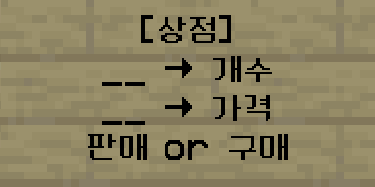
유저 상점 양식 및 설명
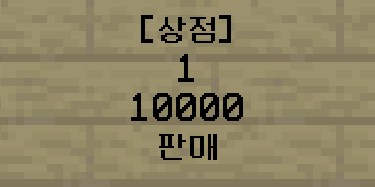
유저 상점 예시
1. 상자를 설치합니다.
2. 상자 앞에 표지판을 붙이고 위 양식에 맞게 작성합니다. (이때 가격은 1개당 가격을 입력해야 합니다.)
3. 판매: 유저상점을 생성한 유저가 아이템을 판매하는 상점입니다. 다른 유저는 물건을 구매할 수 있습니다. \
구매: 유저상점을 생성한 유저가 아이템을 구매하는 상점입니다. 다른 유저는 물건을 판매할 수 있습니다.
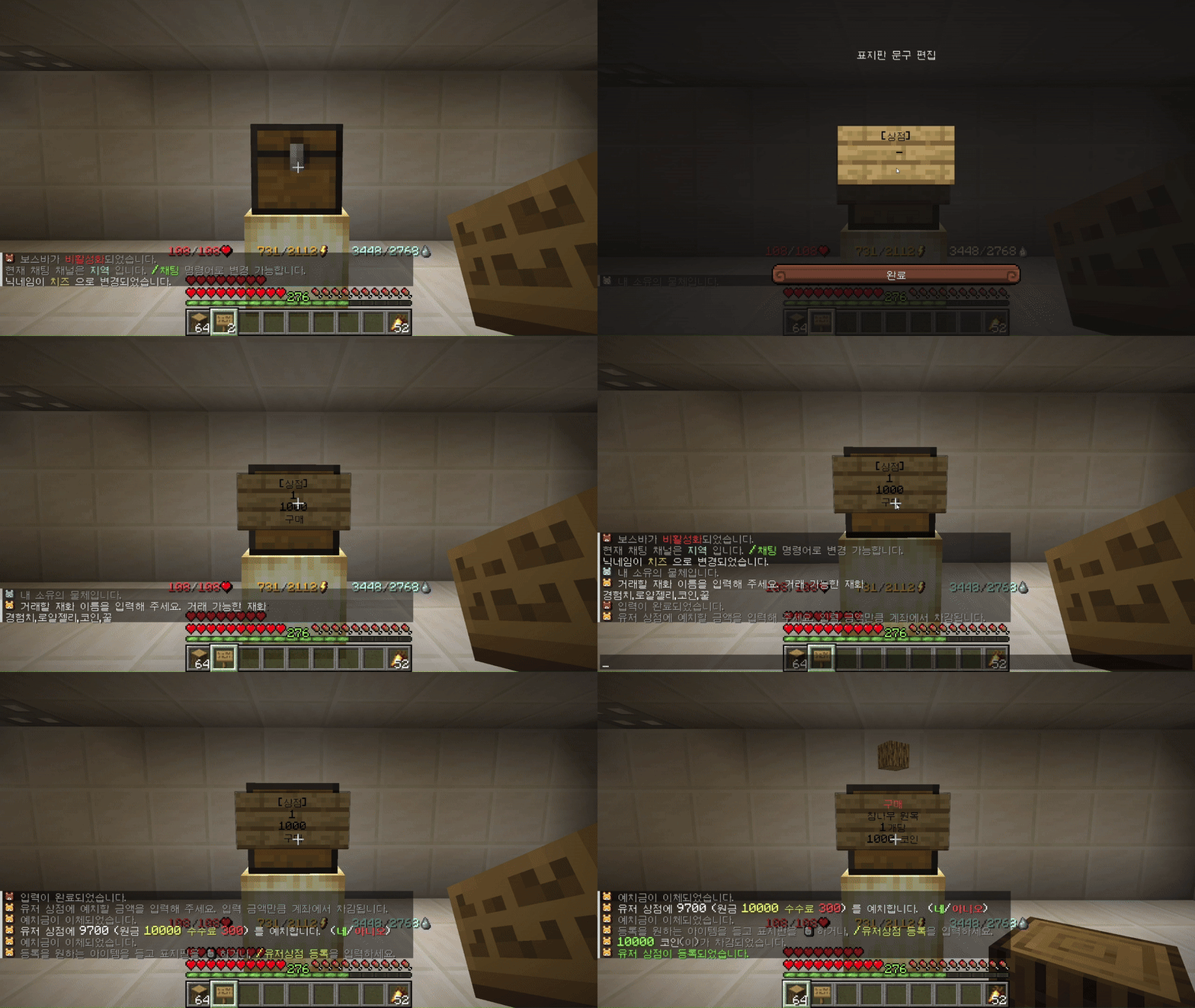
4. 원하는 재화를 채팅에 입력합니다. (코인,꿀,로얄젤리,경험치) 구매 상점을 생성할 때는 상점에 넣을 예치금을 입력해야 합니다.
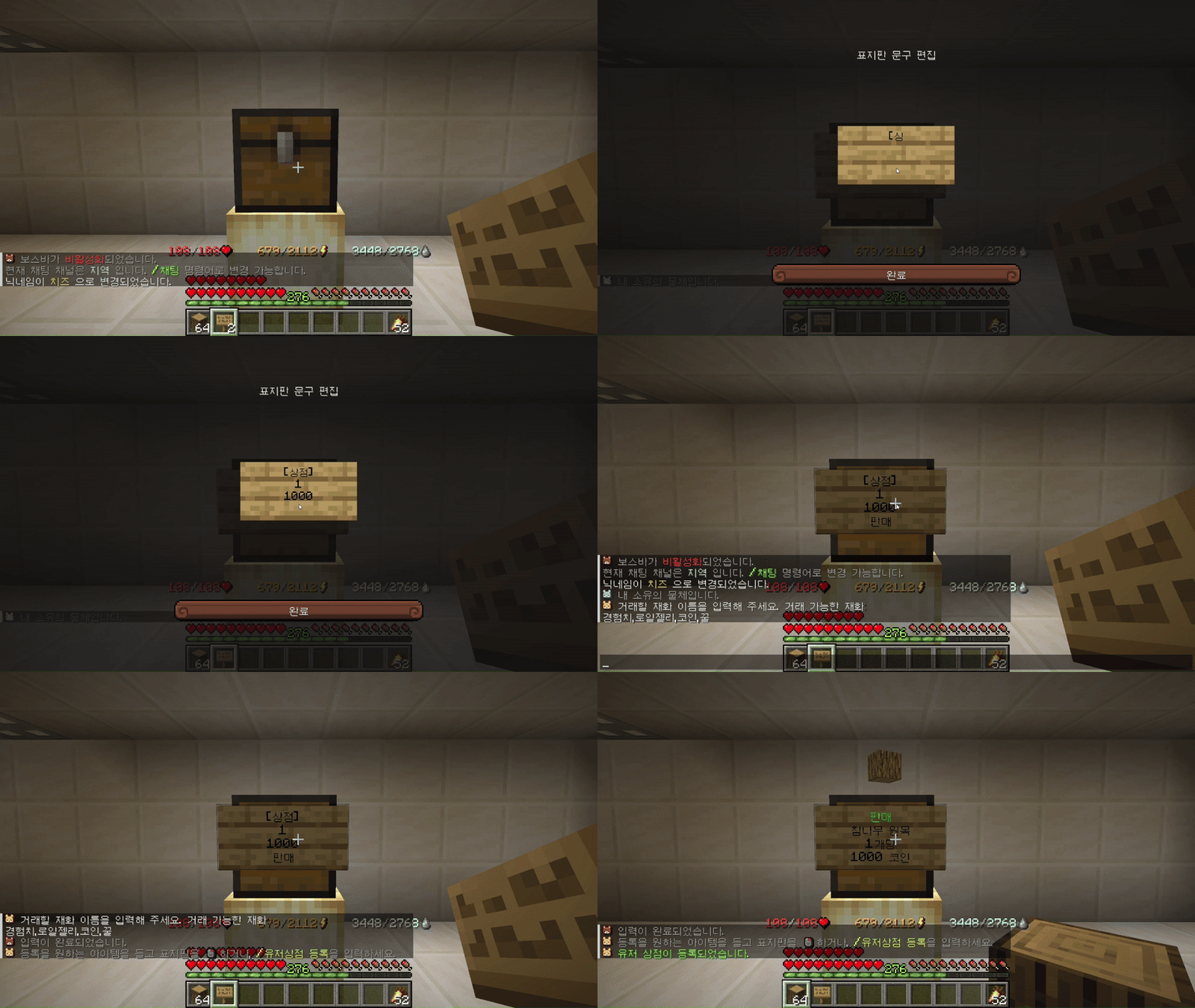
5. 판매할 아이템을 들고 표지판을 우클릭합니다. 판매 상점의 경우에는 상자에 아이템을 넣어야 합니다.
6. 표지판을 우클릭 하여 돋보기 모양으로 유저상점 찾기 기능에 검색될지 여부를 설정할 수 있습니다. \
(기본 상태: 비활성화)
유저상점 생성시 해당 상자는 보호됩니다.
구매 상점 생성 예시
판매 상점 생성 예시
## 관리
구매 상점은 **예치금**이 부족하면 작동하지 않습니다. **구매 상점**의 상자를 열어 구매한 아이템을 수거할 수 있습니다. **판매 상점**의 상자 안에는 판매하려는 아이템이 한 개 이상 있어야 합니다.
표지판 우클릭을 통해서 잔고를 추가하거나 수거할 수 있습니다. 남은 예치금과 판매 대금은 **수거 또는 상점 파괴**시 회수됩니다.
## 이용
다른 사람의 유저상점에 있는 표지판을 우클릭하면 해당 상점에 대한 상세 정보를 확인 가능합니다.\
\
\
1\. 첫번째 아이콘에는 아이템에 대한 정보 확인이 가능합니다.\
\
\
2\. 두번째 아이콘(종이)에는 수량과 가격 및 재화거래 종류 확인이 가능하며 아이콘을 클릭하면 거래가 진행됩니다.\
\
\
3\. 세번째 아이콘(플레이어 머리)에는 구매/판매 확인과 재고 확인이 가능합니다.\
\
(주인이 아이템을 판매하는) `판매` 상점에서는 코인을 지불하고 아이템을 얻게 되고\
(주인이 아이템을 구매하는) `구매` 상점에서는 아이템을 팔아 코인을 얻을 수 있어요.